Best Free Ad Strategy Scanner Tools for B2B Marketers

Most B2B marketers have opened a competitor’s ad library at least once, scrolled for ten minutes, and closed it with a vague sense that the rival is running a lot of carousels. That is the limit of browsing. The useful version of the exercise is a scan: something that pulls the ads in a category, sorts what is working from what is not, and compares that to your own creative in a form you can act on. Several free tools now do a version of this, and they differ mainly in how much of the sorting they do for you.
The platform libraries are the raw material. LinkedIn, Meta, and Google each publish an archive of ads running on their network, free, with no login, and for anyone selling to businesses, the LinkedIn one matters most. On top of those archives sit a small number of free analysis tools. DemandSense’s ad scanner, for example, takes a website address, works out the industry, gathers the strongest LinkedIn ads in that vertical, and emails a report comparing your ads to them. Paid intelligence suites such as Adbeat and Semrush’s AdClarity go further on volume and spend estimates but are outside the scope of a free list. Details below were checked in August 2026.
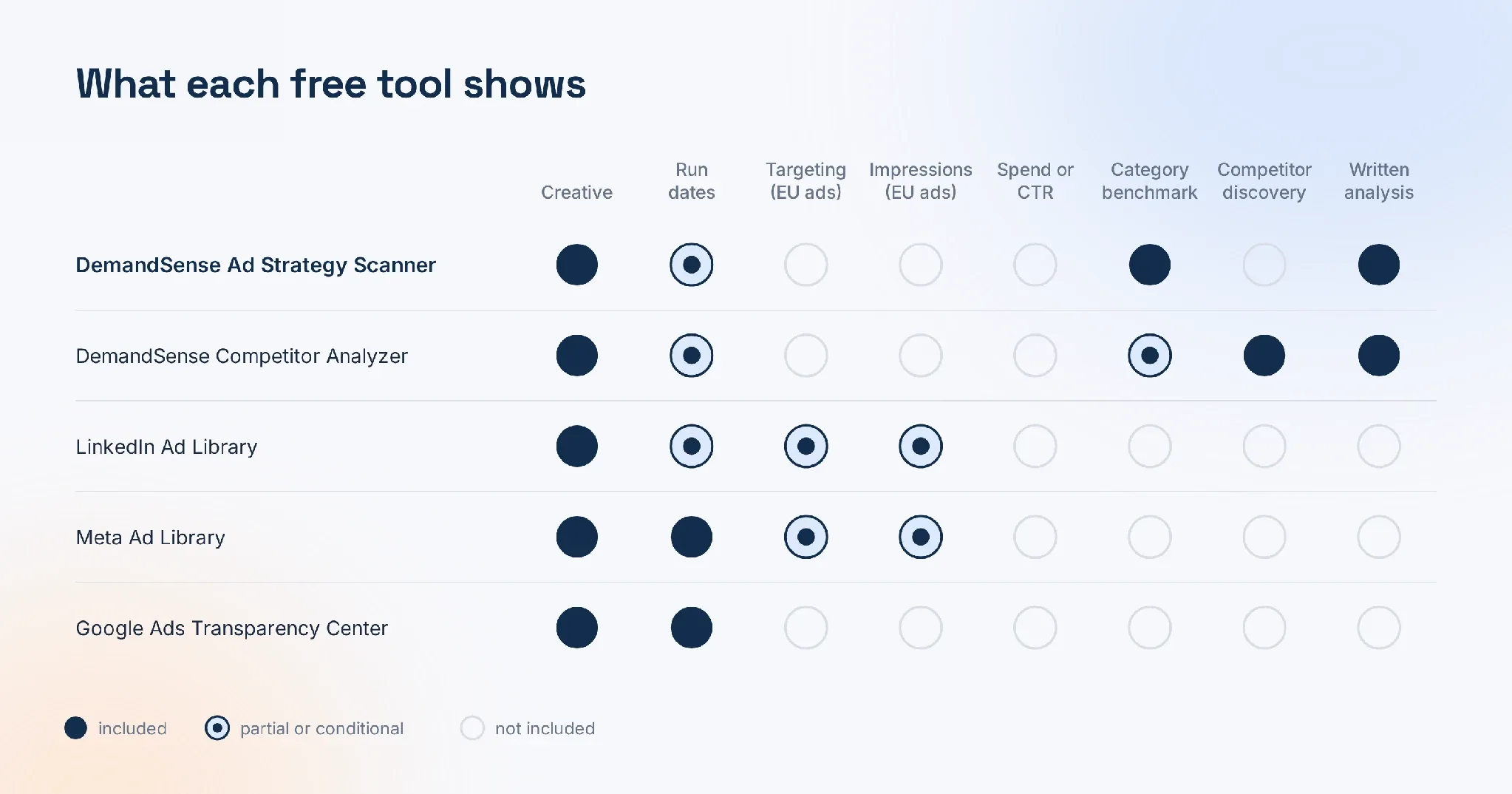
What Each Free Tool Shows
| Tool | Input | Networks | What you get | Analysis included |
|---|---|---|---|---|
| DemandSense Ad Strategy Scanner | Your website URL | Emailed report benchmarking your ads against top ads in your industry | Yes | |
| DemandSense Competitor Analyzer | Your website URL, pick up to two rivals | Emailed report on the chosen competitors’ ads and positioning | Yes | |
| LinkedIn Ad Library | Advertiser, keyword, country, date | Every ad since June 2023, one year after last impression | No | |
| Meta Ad Library | Advertiser, keyword, country | Facebook, Instagram | All active ads; extra detail for EU ads | No |
| Google Ads Transparency Center | Advertiser, region, date, format | Search, YouTube, Display | Ads from verified advertisers | No |
1. DemandSense Ad Strategy Scanner
The scanner is the most hands-off tool here. You enter your company website, the tool identifies the industry, collects the top-performing LinkedIn ads in that vertical, and sends a report to your email within about half an hour. There is no card, no call, and no ad account connection; it reads what is publicly running. The report sets your own ads against the category’s best on messaging, hooks, proof, calls to action, and creative mix, then points at the angles that keep recurring in ads that have stayed live a long time, which is the closest thing to a performance signal a public archive gives away.
Its sibling, the Competitor Analyzer, is the named-rival version. After the same website input it suggests around six companies it finds advertising in your niche, some of which you may not have on your list, and produces a report on up to two of them per free run. Both are one-off reports; continuous monitoring across more rivals sits inside the paid product, which includes a free 30-day trial.
2. LinkedIn Ad Library
LinkedIn’s own archive is the source most B2B scans draw from, and it is better than its reputation. It covers every ad that has run since 1 June 2023 and keeps each one for a year after its last impression, so paused campaigns remain searchable, contrary to a common claim. Search works by advertiser, payer, keyword, country and date range. For every ad you see the creative, format, advertiser and payer. For ads targeted at the EU the Digital Services Act adds estimated impressions by country, run dates and the targeting parameters used, down to job function and company. Spend, clicks and click-through rates are never shown anywhere, so any tool quoting a competitor’s LinkedIn CTR is estimating. The gap is analysis: the library gives you a list, not a read.
3. Meta Ad Library
Meta’s library covers Facebook and Instagram and shows all currently active ads for any page, with start dates and formats. EU-targeted ads carry reach and targeting disclosures similar to LinkedIn’s. For B2B teams, it is most useful for checking whether a competitor runs retargeting or event campaigns off-LinkedIn, and for lifting creative patterns that travel between networks. It has no built-in scoring or comparison.
4. Google Ads Transparency Center
Google’s center lists ads from verified advertisers across Search, YouTube, and Display, filterable by region, date range, and format. It is the quickest way to see a rival’s search messaging and whether they are bidding on category terms, and its date filter makes it easy to spot a campaign change. Like the other platform libraries, it shows creative but not performance, and it offers nothing in the way of interpretation.
Reading the Results
Two habits make any of these worth the time. First, sort by longevity: an ad still running after months has usually earned its budget, and the platform libraries expose run dates for at least some ads. Second, look for the position nobody in the category is claiming, since that is where a smaller advertiser can stand out. The scanners do that sorting for you; the libraries leave it to you. A sensible workflow is to run the free report first to see the shape of the category, then use the libraries to dig into individual rivals.
Reference pages: LinkedIn’s Ad Library help and Google Ads Transparency Center. The free reports come from DemandSense, which also runs a monthly, human-curated gallery of high-performing LinkedIn creative by industry on every plan.